
MS iCalc1.0 - App Store
You'll be able to see results in few seconds.
Publisher Description
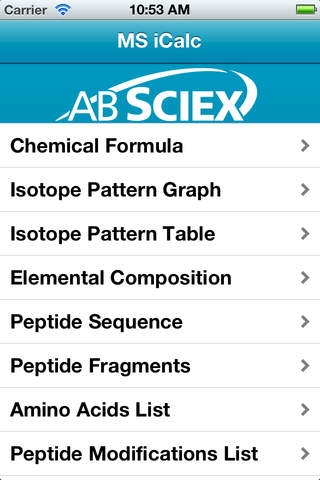
A must have for every mass spectroscopist, MS iCalc is a collection of handy mass spec calculators designed to help you quickly get numbers and information you use every day, like mass and mass/charge, elemental composition, isotope patterns, m/z values, peptide modifications, and much more.
Here s the complete list:
Chemical Formula: Enter an elemental formula on the periodic table keyboard, and view its mass, mass/charge, and other properties.
Isotope Pattern Graph: View a zoomable graphical display showing a molecule s isotope pattern, and specify multiple formulas to determine what resolution is required to separate them.
Isotope Pattern Table: View a molecule s isotope pattern.
Elemental Composition: Enter an experimental m/z and a mass accuracy to view a list of matching elemental formulas.
Peptide Sequence: Specify a peptide sequence (with optional modifications) to view its mass and mass/charge.
Peptide Fragments: Enter a peptide sequence and calculate the m/z values of MS/MS fragment ions. You can choose which fragment types (y, b, etc.) to use.
Amino Acids: View the names, symbols, and masses of the amino acids.
Peptide Modifications: List available peptide modifications with their name, symbol, and mass shift.
Weight / Volume Conversion: Convert from one set of weight or concentration units to another.
Requires iOS 5.0 or later. Compatible with iPhone, iPad, and iPod touch.
About MS iCalc
The company that develops MS iCalc is AB SCIEX Pte. Ltd.. The latest version released by its developer is 1.0.
To install MS iCalc on your iOS device, just click the green Continue To App button above to start the installation process. The app is listed on our website since 2012-05-15 and was downloaded 0 times. We have already checked if the download link is safe, however for your own protection we recommend that you scan the downloaded app with your antivirus. Your antivirus may detect the MS iCalc as malware if the download link is broken.
How to install MS iCalc on your iOS device:
- Click on the Continue To App button on our website. This will redirect you to the App Store.
- Once the MS iCalc is shown in the iTunes listing of your iOS device, you can start its download and installation. Tap on the GET button to the right of the app to start downloading it.
- If you are not logged-in the iOS appstore app, you'll be prompted for your your Apple ID and/or password.
- After MS iCalc is downloaded, you'll see an INSTALL button to the right. Tap on it to start the actual installation of the iOS app.
- Once installation is finished you can tap on the OPEN button to start it. Its icon will also be added to your device home screen.
Program Details
System requirements
Download information
Pricing
Version History
version 1.0
posted on 2012-05-15
Disclaimer
Official App Store Link
We do not host MS iCalc on our servers. We did not scan it for viruses, adware, spyware or other type of malware. This app is hosted by Apple and passed their terms and conditions to be listed there. We recommend caution when installing it.
The App Store link for MS iCalc is provided to you by apps112.com without any warranties, representations or guarantees of any kind, so access it at your own risk.
If you have questions regarding this particular app contact the publisher directly. For questions about the functionalities of apps112.com contact us.
